DESKTOP PLAN-R
For users with no internet access or a limited connection, Digital Practices provides Desktop PLAN-R for deployment on local computers. The software is supplied as an installer for Windows operating systems.
Desktop PLAN-R does not include some features available in On-Premise PLAN-R and On-Cloud PLAN-R. The User Manual identifies features unavailable in this deployment type.
Hardware Requirements
The hardware requirements for Desktop PLAN-R are based on internal load testing conducted by Digital Practices. They provide an approximate baseline for selecting the customer's hardware.
| CPU cores | RAM, GB | Storage, GB |
|---|---|---|
| 4 cores / 8 threads | 32 GB | 300 GB SSD |
Operating System Requirements
Supported operating systems:
- Windows 10 64-bit.
- Windows 11 64-bit.
Requesting the Distribution Package
To obtain the archive download link and password, send the following request to user support at support@dppm.pro:
"Please provide access to download the Desktop PLAN-R distribution package for company X."
Download the distribution package using the link provided.
Installation
Run the downloaded file. The application installation window opens.
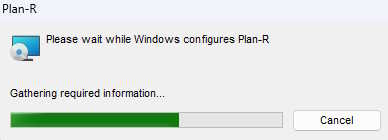
When installation is complete, Desktop PLAN-R starts automatically.