BACKUP
You can use the following methods to back up the database before an update:
- Use the
./dump.shscript included in the distribution package. Run the following command to create a backup of the database's current state in/opt/dppm/postgres_dump:
./dump.sh -p /opt/dppm/postgres_dump
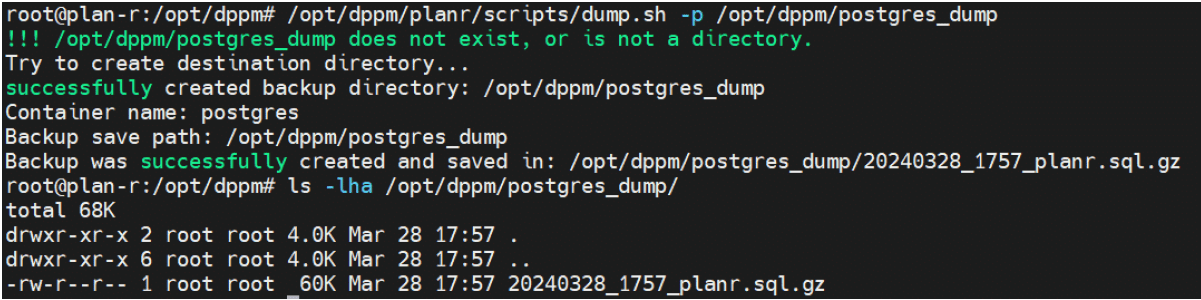
Backing up the database before an update (1)
- Use the built-in tools. Open the
/opt/dppm/postges_dumpdirectory, creating it if it does not exist, and run:
docker exec postgres /bin/bash -c "export PGPASSWORD=planr && pg_dump -U planr planr" | gzip -9 > planr_latest.sql.gz

ls -lha

Backing up the database before an update (2)
Configuring Scheduled Backups
To schedule backups, add the dump.sh script to crontab. To view the script's command-line options, run ./dump.sh -h.
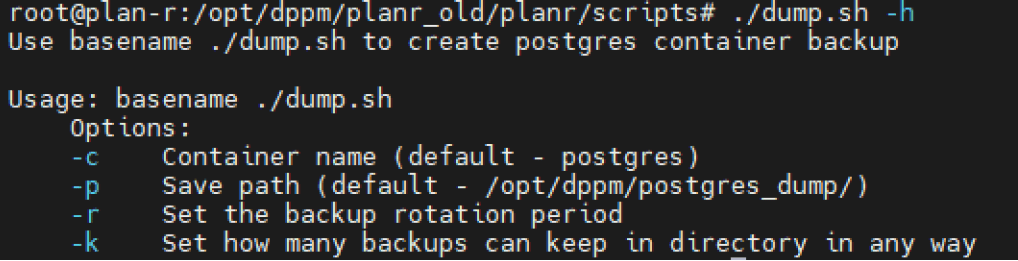
Command-line options for dump.sh
The example below shows how to run the script using crontab. In this example, the script runs every night at 3:00 AM and saves backups to /opt/dppm/postgres_dump/. The rotation period is set to 14, meaning the directory retains 14 current backups. The minimum number of files retained regardless of the rotation settings is 5.

Running the script on a schedule
Full Backup (Database and File Storage)
To back up uploaded files from the planr-storage volume along with the database, run dump.sh with the -f flag from the /scripts directory:
./dump.sh -f -p /opt/dppm/postgres_dump
- The script temporarily stops Plan-R containers (except PostgreSQL), creates the
YYYYMMDD_HHMMSS_planr_full.tararchive (excluding temporary files), and starts the services back up. - Running
dump.shwithout-fbacks up only the database (*_planr.sql.gz) without stopping containers. Rotation (-r/-k) operates separately for*_planr.sql.gzand*_planr_full.tar. - If the PostgreSQL container is not named
postgres, specify it with-c <name>.
Restoring from a Backup
Use ./restore.sh to restore data (the file path can be passed positionally or with -f):
- Restore the database only:
./restore.sh /opt/dppm/postgres_dump/20261014_030000_planr.sql.gz
- Restore the database and file storage (
planr-storage) from a full backup archive:
./restore.sh /opt/dppm/postgres_dump/20261014_030000_planr_full.tar
Important notes before running:
- Restoring overwrites the target database (and the
storagedirectory inplanr-storagewhen restoring a full archive); Plan-R containers except PostgreSQL are temporarily stopped and restarted automatically. - The script prompts for
[y/n]confirmation (an empty response cancels; pass-yfor non-interactive execution). - Before replacing data, a safety backup (
*_planr_latest.sql.gzor*_planr_latest_full.tar) is saved next to the input file — ensure the directory is writable. Pass the safety backup to./restore.shto roll back. - For a custom PostgreSQL container name, pass
-c <name>; run./restore.sh -hto see all options.
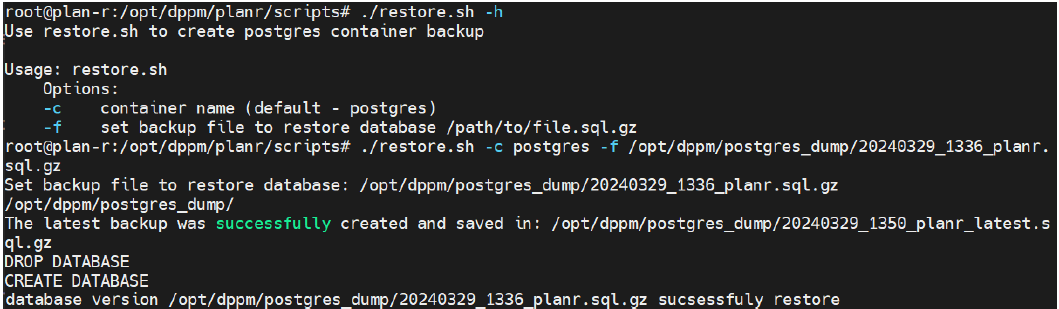
Restoring the database from a backup file