PROXY SERVER
The proxy provides a single entry point to the application. It can operate as the main web server with secure HTTPS connections or behind an external web server configured by the customer.
Configure the proxy using environment variables with the PROXY prefix.
Configuring the Proxy
Service ports:
- PROXY_PORT=80 — the main application service port.
- PROXY_ADMIN_PORT=81 — the administration console service port.
- PROXY_SSL_PORT=443 — the secure HTTPS service port.
The proxy supports two connection modes:
- Secure HTTPS connections.
- Unencrypted connections.
PROXY_SSL_ENABLED — A true/false value that controls secure HTTPS connections using SSL certificates. The default is true.
# Enable HTTPS
PROXY_SSL_ENABLED=true
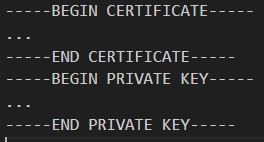
PROXY_CERT_PATH — An absolute or relative path to a certificate file issued by the customer's certificate authority. The file must use .pem format, contain the server certificate and private key, and include the complete certificate chain.
# Certificate path
PROXY_CERT_PATH=/etc/ssl/planr.pem
To create a .pem file, run:
cat example.crt example.key > planr.pem
The resulting certificate file should have the following structure:
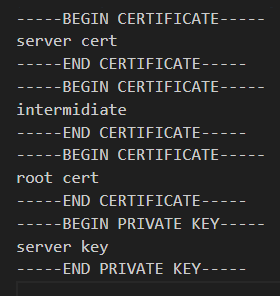
If the certificate chain includes server → intermediate → root certificates, use:
cat your-server.cert your-intermediate.cert your-root.cert your-server.key > planr.pem
The resulting certificate file should have the following structure:
Configuring an SSL Proxy with an External NGINX Web Server
To configure an SSL proxy with an external NGINX web server:
- Change the following variables:
- PROXY_PORT=8080 — use a port other than the default 80, which the external web server will listen on.
- PROXY_ADMIN_PORT=8081 — use a port other than the default 81, which the external web server will listen on.
- PROXY_SSL_PORT=8443 — use a port other than the default 443, which the external web server will listen on.
- Make sure the external web server supports WebSocket.
- Configure the external web server to forward requests to http://localhost:8080, using the port specified by PROXY_PORT, and http://localhost:8081, using the port specified by PROXY_ADMIN_PORT.
Examples
In the NGINX configuration, replace <set_your_domain> in server_name with your domain name. Set ssl_certificate and ssl_certificate_key to the certificate and private key paths, respectively—for example, /etc/ssl/certs/example.crt and /etc/ssl/private/example.key.
NGINX Configuration
upstream planr {
   server localhost:8080;
}

upstream planr_admin {
   server localhost:8081;
}

server {
  listen 80;
  # Specify the DNS name
  server_name <set_your_domain>;

  # Redirect all traffic to SSL
  rewrite ^ https://$host$request_uri/ permanent;
}

server {
   listen 81 ssl;
   # Specify the DNS name
   server_name <set_your_domain>;

   # SSL Cert
   # Specify the certificate paths on the server
   ssl_certificate <path to certificate>;
   ssl_certificate_key <path to key certificate>;

   # SSL settings
   ssl_protocols TLSv1.2 TLSv1.3;

   large_client_header_buffers 4 8k;
   proxy_read_timeout 12h;
   # Maximum upload file size
   # 0 means unlimited; the limit is configured in the administration console
   client_max_body_size 0;
   client_body_timeout 1h;
   client_header_buffer_size 8k;
   client_header_timeout 1h;
   include /etc/nginx/mime.types;
   gzip on;
   gzip_vary on;
   gzip_min_length 5;
   gzip_proxied expired no-cache no-store private auth;
   gzip_types text/plain application/json text/css text/xml text/javascript application/x-javascri>
   gzip_disable "MSIE [1-6]\.";


   location / {
   proxy_set_header X-Forwarded-For $proxy_add_x_forwarded_for;
   proxy_set_header Host $host;

   proxy_pass http://planr_admin;

   # enable WebSockets
   proxy_http_version 1.1;
   proxy_set_header Upgrade $http_upgrade;
   proxy_set_header Connection "upgrade";
   }
}

server {
   listen 443 ssl;
   server_name <set_your_domain>;

   # SSL Cert
   ssl_certificate <path to certificate>;
   ssl_certificate_key <path to key certificate>;

   # SSL settings
   ssl_protocols TLSv1.2 TLSv1.3;

   large_client_header_buffers 4 8k;
   proxy_read_timeout 12h;
   # Maximum upload file size
   # 0 means unlimited; the limit is configured in the administration console
   client_max_body_size 0;
   client_body_timeout 1h;
   client_header_buffer_size 8k;
   client_header_timeout 1h;
   include /etc/nginx/mime.types;
   gzip on;
   gzip_vary on;
   gzip_min_length 5;
   gzip_proxied expired no-cache no-store private auth;
   gzip_types text/plain application/json text/css text/xml text/javascript application/x-javascri>
   gzip_disable "MSIE [1-6]\.";

   location / {
      proxy_set_header X-Forwarded-For $proxy_add_x_forwarded_for;
      proxy_set_header Host $host;

      proxy_pass http://planr;

      # enable WebSockets
      proxy_http_version 1.1;
      proxy_set_header Upgrade $http_upgrade;
      proxy_set_header Connection "upgrade";
   }
}