SYSTEM EVENT LOGGING
PLAN-R logs all system events to support analysis of user and system administrator actions and to identify errors that occur during operation. By default, event information is written in JSON format to the standard output of the microservice containers. Additional information may be included in the log depending on the event type.
For the complete list of system events, see the System Event List table.
The logging subsystem is configured using environment variables.
Information security events can also be forwarded to a separate logging server.
Extended information, such as the values of modified fields or data, can be added to event logs. Use this feature with caution, as it significantly increases the volume of logged information. It is recommended only for application debugging.
# Include additional information in event logs. Default: false.
LOGS_EXTEND=true
Information Security Events
The system can redirect information security events to a separate stream for forwarding to a dedicated log collection server. Information security events include command logs related to user management, user roles, system access, and Active Directory integration.
To forward information security events to a separate server, configure the following environment variables:
# Enable a separate stream for information security logs.
LOGS_SECURITY_SPLIT=true

# Specify the log collection server address.
LOGS_SECURITY_SERVER_ADDRESS=your_log_srv.domain.org

# Optionally specify the log collection server port. Default: 514.
LOGS_SECURITY_SERVER_PORT=5141

# Optionally specify the network protocol for log transmission. Default: UDP.
LOGS_SECURITY_SERVER_PROTOCOL=tcp

# When using TCP, enable automatic reconnection to the logging server if needed. Default: false.
LOGS_SECURITY_SERVER_TCP_RECONNECT=true

# Include vendor information in information security logs if needed. Default: false.
LOGS_SECURITY_ADD_DEVICE_INFO=true

# Enable security log output in CEF format if needed. Default: false.
LOGS_SECURITY_CEF_ENABLED=true
JSON Format
Table 1. JSON Field Descriptions
| Field | Description | Format | Required |
|---|---|---|---|
| time | Time when the event occurred. | timestamp | Yes |
| trace_id | Unique identifier of the request execution. Can be used to trace all commands involved in processing the request. | UUID v4 | Yes |
| command_name | Event identifier. | string | Yes |
| command_description | Human-readable event description. | string | No |
| is_infosec | Indicates whether the event belongs to the information security event group. | boolean | No |
| device_vendor | Application vendor. | string | No |
| device_product | Application name. | string | No |
| device_version | Application version. | string | No |
| client_ip | IP address of the client that sent the request. | string | Yes |
| user_id | Unique identifier of the user on whose behalf the request is executed. | UUID v4 | No |
| user_login | Login of the user on whose behalf the request is executed. | string | No |
| space_id | Unique identifier of the space in which the request was executed. | UUID v4 | Yes |
| space_name | Name of the space in which the request was executed. | string | Yes |
| target_space_id | Unique identifier of the space targeted by the request, that is, the space in which data was modified. | UUID v4 | No |
| target_space_name | Name of the space targeted by the request. | string | No |
| eps_id | Unique identifier of the Enterprise Project Structure (EPS) node targeted by the request. | UUID v4 | No |
| eps_name | Name of the EPS node targeted by the request. | string | No |
| eps_type | Type of EPS node targeted by the request. One of: space | facility | schedule | project | version | string | No |
| auth_strategy | Type of provider used to authenticate the user request. One of: activedirectory | openid | kerberos | saml | local | apikey | standalone | string | No |
| target_user_id | Unique identifier of the user targeted by the request. For example, the identifier of a user being created or a user whose settings were modified by the request. | UUID v4 | No |
| target_user_login | Login of the user targeted by the request. | string | No |
| role_id | Unique identifier of the user role targeted by the request. | UUID v4 | No |
| role_name | Name of the user role targeted by the request. | string | No |
| target_role_id | Unique identifier of the user role assigned to the EPS node when access permissions are changed. | UUID v4 | No |
| target_role_name | Name of the user role assigned to the EPS node when access permissions are changed. | string | No |
| target_subject_id | Unique identifier of the object targeted by the request. For example, the identifier of an Active Directory connection. | UUID v4 | No |
| target_subject_name | Name of the object targeted by the request. | string | No |
| target_subject_state | Status of the object targeted by the request. | string | No |
| target_subject_type | Type of the object targeted by the request. | string | No |
| updated_fields | List of fields modified by the request. | string | No |
| success | Indicates whether the operation succeeded. For example, the result of user authentication in the system. | boolean | No |
Example
{ "time": 1749112947148, "trace_id": "42195a9e-17c3-4e2d-9868-ba7f7c253123", "command_name": "auth.local", "command_description": "Local user authentication", "is_infosec": true, "client_ip": "148.93.143.195", "user_id": "3ce9d1d6-b169-498f-8d28-33aced2353a0", "user_login": "ivanov@org.ru", "success": true, "container_name": "planr_ru-main-1", "request_source": "main" }
CEF Format
In addition to JSON, logs can be output in CEF format according to the standard defined in Implementing ArcSight Common Event Format (CEF) - Version 26.
To output information security events in CEF format, configure the following environment variables:
# Enable security log output in CEF format if needed. Default: false.
LOGS_SECURITY_CEF_ENABLED=true

# Set the date format for security logs in CEF format if needed. Default: MMM DD YYYY HH:mm:ss.SSS zzz.
LOGS_SECURITY_CEF_DATE_FORMAT=MMM DD YYYY HH:mm:ss.SSS z
Table 2. CEF Custom Field Descriptions
| Field | Description | Format | Required |
|---|---|---|---|
| DPPMPlanRTraceId | Unique identifier of the request execution. Can be used to trace all commands involved in processing the request. | UUID v4 | Yes |
| DPPMPlanRSpaceId | Unique identifier of the space in which the request was executed. | UUID v4 | Yes |
| DPPMPlanRSpaceName | Name of the space in which the request was executed. | string | Yes |
| DPPMPlanRTargetSpaceId | Unique identifier of the space targeted by the request, that is, the space in which data was modified. | UUID v4 | No |
| DPPMPlanRTargetSpaceName | Name of the space targeted by the request. | string | No |
| DPPMPlanREpsId | Unique identifier of the Enterprise Project Structure (EPS) node targeted by the request. | UUID v4 | No |
| DPPMPlanREpsName | Name of the EPS node targeted by the request. | string | No |
| DPPMPlanREpsType | Type of EPS node targeted by the request. One of: space | facility | schedule | project | version | string | No |
| DPPMPlanRAuthStrategy | Type of provider used to authenticate the user request. One of: activedirectory | openid | kerberos | saml | local | apikey | standalone | string | No |
| DPPMPlanRUserId | Unique identifier of the user targeted by the request. For example, the identifier of a user being created or a user whose settings were modified by the request. | UUID v4 | No |
| DPPMPlanRUserLogin | Login of the user targeted by the request. | string | No |
| DPPMPlanRRoleId | Unique identifier of the user role targeted by the request. | UUID v4 | No |
| DPPMPlanRRoleName | Name of the user role targeted by the request. | string | No |
| DPPMPlanRTargetRoleId | Unique identifier of the user role assigned to the EPS node when access permissions are changed. | UUID v4 | No |
| DPPMPlanRTargetRoleName | Name of the user role assigned to the EPS node when access permissions are changed. | string | No |
| DPPMPlanRTargetSubjectId | Unique identifier of the object targeted by the request. For example, the identifier of an Active Directory connection. | UUID v4 | No |
| DPPMPlanRTargetSubjectName | Name of the object targeted by the request. | string | No |
| DPPMPlanRTargetSubjectState | Status of the object targeted by the request. | string | No |
| DPPMPlanRTargetSubjectType | Type of the object targeted by the request. | string | No |
| DPPMPlanRUpdatedFields | List of fields modified by the request. | string | No |
| DPPMPlanRSuccess | Indicates whether the operation succeeded. For example, the result of user authentication in the system. | boolean | No |
Example
Sep 19 08:26:10 host CEF:0|dppm|planr|602.0|auth.openid|Authentication using OpenID Connect (OIDC)|Low|src=10.0.0.1 suid=d1c3d009-4937-41b4-83af-ca6d3568eef6 suser=iv_ivn@org.com DPPMPlanRTraceId=36794d27-ff14-4502-a6f7-369e3417d6b8 DPPMPlanRSpaceId=7943063b-d137-4ba1-bedf-3166e35444ff DPPMPlanRSpaceName=My Organization DPPMPlanRSuccess=true
Logs are collected and processed by the FluentBit log collector and then stored in Grafana Loki. The distribution package also includes Grafana for viewing and analyzing logs.
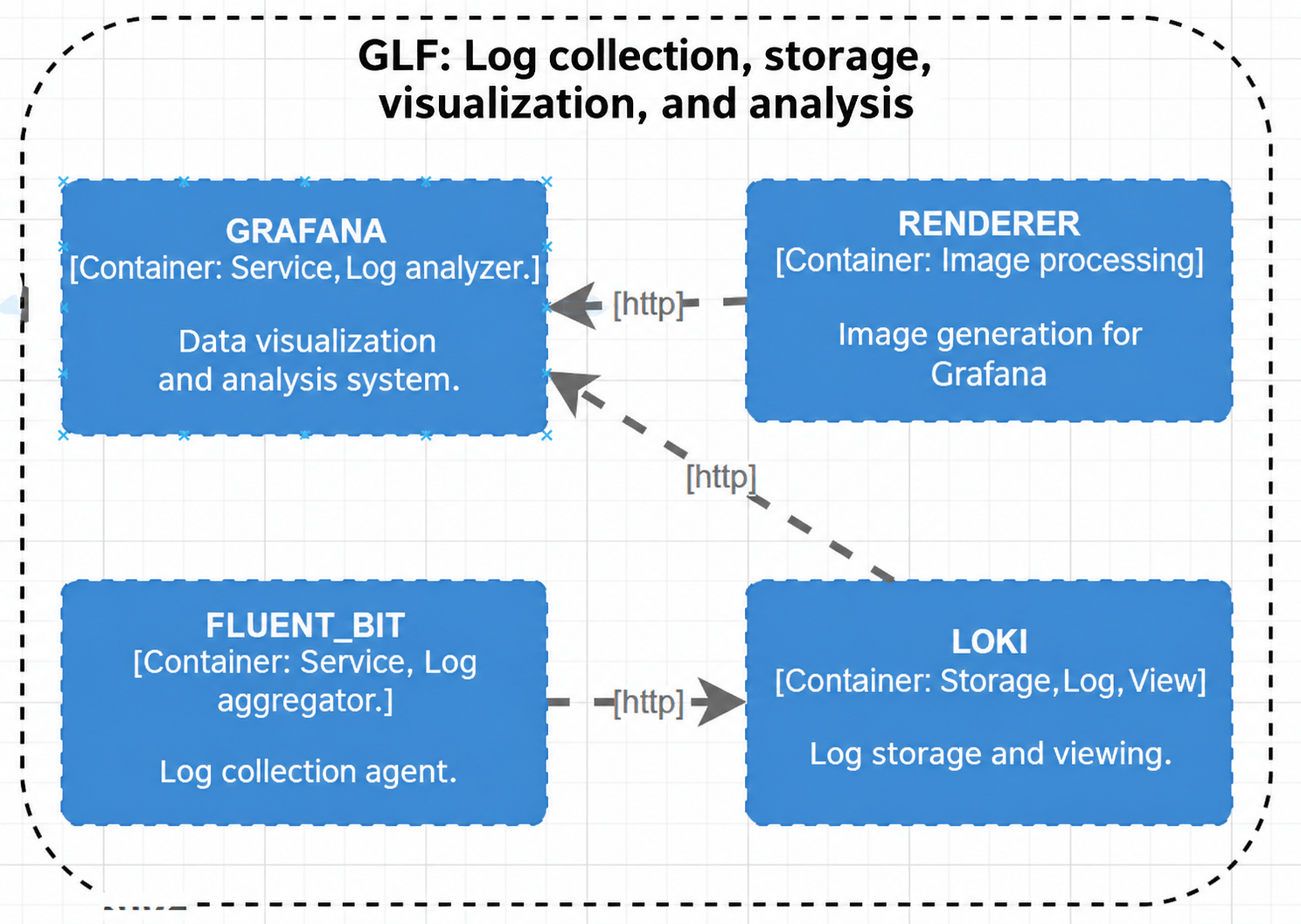
Use FluentBit to transform, filter, or forward events to external systems.