OBTAINING THE SYSTEM DISTRIBUTION ARCHIVE
Requesting Access
To obtain the archive download link and password, send the following request to user support at support@dppm.pro:
"Please provide access to download the archive and its password for company X."
Proceed with the steps below only after access has been granted.
Using the link provided, download the distribution archive and its checksum file, such as planrXXX.x.zip and planrXXX.x.zip.sha256, where X represents the software version.
Starting with version 509.0, PLAN-R is supplied in two archives: planrXXX.x.zip, containing only the core services, and external_servises_XXX.zip, containing additional external services such as Redis, PostgreSQL, and Grafana. Installing the external services from external_servises_XXX.zip is required to run PLAN-R if the customer does not plan to use their own external services.
Distribution Contents
The planrXXX.x.zip archive containing the core services has the following structure:
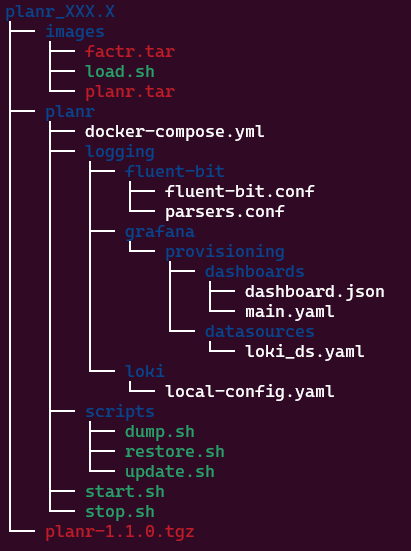
PLAN-R Archive Structure
- The planr directory contains configuration files for PLAN-R and all required services.
- stop.sh — a Bash script that stops PLAN-R.
- start.sh — a Bash script that starts PLAN-R.
- .env — environment variables used to configure PLAN-R. See Environment Variables.
- docker-compose.yml — settings for PLAN-R and the services required to run it.
- The /scripts directory contains dump.sh (for backing up the PostgreSQL database and
planr-storagevolume) and restore.sh (for restoring from a backup). See Backup. It also contains update.sh, which can perform an automated PLAN-R installation or an automated PLAN-R update. - The /logging directory contains the configuration files required by the logging system: Grafana, Loki, and Fluent Bit.
- The images directory contains archived PLAN-R Docker images for the software version.
- load.sh — a Bash script that loads Docker images from the archive.
- planr-x.x.x.tgz — a Helm chart for Kubernetes deployment.
External Services Archive Contents
The external_servises_XXX.zip archive containing additional external services has the following structure:
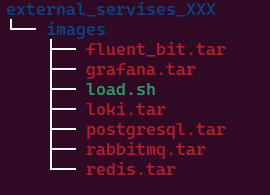
External Services Archive Structure
- The images directory contains the external services included in the distribution. Install them if the customer does not plan to use their own external services. In this case, installing these services is required to run PLAN-R.
- load.sh — a Bash script that loads Docker images from the archive.
Verifying the Distribution Checksum
After downloading the distribution archive and its checksum file, such as planr_411.0.zip and planr_411.0.zip.sha256, verify the distribution checksum for security. Run the following command in a terminal.
Attention! The distribution archive and checksum file must be in the same directory.
sha256sum -c planr_411.0.zip.sha256
If the checksums match, the command outputs "OK". This indicates that the file has not been modified and the archive's integrity is preserved.
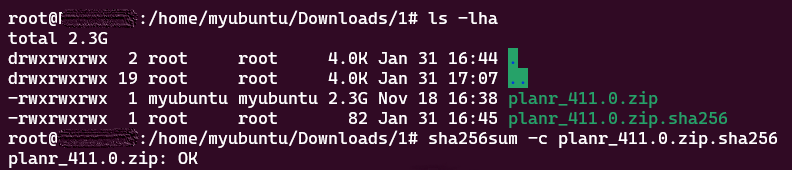
Verifying the PLAN-R Distribution Checksum
To verify the checksum of the external services archive, run:
sha256sum -c external_services_509.zip.sha256

Verifying the External Services Archive Checksum