ANNEX 1. SOURCE DATA REQUIREMENTS FOR IMPORT INTO PLAN-R
The PLAN-R construction project management platform allows you to import activity schedules, including network schedules and linear schedules, in various file formats.
The minimum set of required attributes for importing data into PLAN-R, regardless of the imported file format, is:
- a unique identifier for the activity or work breakdown structure node;
- the name of the activity or work breakdown structure node.
PLAN-R supports the following file formats for import:
- .xer files — project data exported from Oracle Primavera, Spider Project, and other systems;
- .xml files — project data exported from Microsoft Project and other systems;
- .xlsx files — Microsoft Excel files.
.xlsx files must contain a data table with the following structure:
- the first row specifies the data type from the list of attribute data types supported in PLAN-R;
- the second row contains the names of activity or work breakdown structure node attributes;
- the third and subsequent rows contain attribute values for activities or work breakdown structure nodes.
The following attribute data types are supported in PLAN-R:
Attribute Data Types Supported in PLAN-R
| Attribute Type | Name |
|---|---|
| date | Date |
| number | Number |
| string | String (text data) |
| through | Cross-version attribute containing text data |
| boolean | Boolean |
Attention! When a new Actual version of a schedule is created by importing a file, a cross-version attribute preserves activity values even if those values or the attribute itself are missing from the imported file. Similarly, when a new Actual version is assigned, the attribute preserves values from the Actual version being replaced. This attribute can be used to store codes for linking schedules or linking activities to a BIM model.
System Attributes
| Name | Field | Data Type | Properties | Attribute Purpose |
|---|---|---|---|---|
| % of planned labor completed | labour_progress
_on_date | Number [number] | Read-only, calculated | Percentage ratio of approved actual labor to approved planned labor as of the current date. Calculated automatically when you click "Refresh planned cost, PV and labor on date", using the formula: Note: cannot exceed 100%. Example: if the current date is May 15, 2025, approved actual and planned daily values are totaled through May 14, 2025. Their percentage ratio is then calculated. |
| PV completion % | volume_progress
_on_date |
Number [number] | Read-only, calculated | Percentage ratio of approved actual physical quantity to approved planned physical quantity as of the current date. Calculated automatically when you click "Update planned PV and labor units on date", using the formula: Note: cannot exceed 100%. |
| % by quantity | progress_
by_volume | Number [number] | Read-only, calculated | Percentage ratio of actual physical quantity to planned physical quantity. Calculated automatically when the attribute values are populated, using the formula: Cannot exceed 100%. When scheduling is calculated using physical quantities, the quantity completion percentage is used as progress. Note: to ensure that the quantity completion percentage is accurate, approve actual physical quantities from resource planning using "Accepted daily actuals" (see "Managing Actual Data in Daily Planning"). |
| % by cost | progress_
by_cost | Number [number] | Read-only, calculated | Percentage ratio of actual cost to planned cost. Calculated automatically when the attribute values are populated, using the formula: Cannot exceed 100%. When calculating the schedule (see "Annex 2. Schedule Calculation Algorithms for Different Scenarios")
using total cost, the cost completion percentage is used as progress. Note: to ensure that the cost completion percentage is accurate, approve actual costs from resource planning using "Accepted daily actuals" (see "Managing Actual Data in Daily Planning"). |
| % by labor units | progress_
by_labour | Number [number] | Read-only, calculated | Percentage ratio of actual labor to planned labor. Calculated automatically when the attribute values are populated, using the formula: Cannot exceed 100%. When scheduling is calculated using labor, the labor completion percentage is used as progress. Note: to ensure that the labor completion percentage is accurate, approve actual labor from resource planning using "Accepted daily actuals" (see "Managing Actual Data in Daily Planning") |
| In range | in_scope | String [string] | List | Activity execution mode used when calculating the schedule (see "Schedule Calculation"). Possible values:
|
| Visual profile | bim_appearance
_profile | String [string] | Editable | Visual profile value. The visual profile controls the display of the BIM model element linked to the activity (see "BIM-R. Working with Information Models") during 4D playback (see "4D Player"). The attribute contains predefined visual profiles: Install, Maintain, Neutral (invisible), Remove, and Temporary. You can configure a custom visual profile and assign it to an activity. Visual profiles determine the element color before, during, and after work on the element. They can also simulate the direction in which an element appears in the 3D model, such as bottom up or top to bottom. |
| Constraint Impact on Late Dates | late_date_
constraint_impact | String [string] | Read-only, calculated | Calculated automatically during scheduling when "Perform an additional calculation of late dates without constraints / deadline" is selected. The attribute has four possible values:
"Successor constraint / deadline" — one or more successors have constraints or deadlines that affect the current activity's late dates. |
| Date of change | updated_at | Date [date] | Read-only, automatically populated | Activity modification date. Populated automatically by PLAN-R when:
|
| Start limit date | start_limit_date | Date [date] | Editable | Activity start constraint date. Used together with "Start limit type". |
| Finish limit date | finish_limit_date | Date [date] | Editable | Activity finish constraint date. Used together with "Finishing limit type". |
| Creation date | created_at | Date [date] | Read-only, automatically populated | Activity creation date. Populated automatically by PLAN-R when:
|
| Deadline | deadline | Date [date] | Editable | Latest permitted activity completion date. Entered manually by the user. |
| Unit of measure | measure | String [string] | Editable | The unit in which the physical quantity or resource quantity is expressed. A value entered in "Unit of measure" is used in resource planning (see "Planning in PLAN-R") and included in parentheses in the "Name" attribute. |
| Units/time | base-intensity
-by-volume | Number [number] | Editable | Physical or resource quantity that can be completed in one working hour. Defines the activity production rate for physical quantities or resources. Used when calculating the schedule with scenarios "2.1 By physical quantity production rate" and "3.1 By physical quantity production rate, start/finish from daily actuals". |
| Source | origin | String [string] | Read-only | Identifies the origin of a record. Distinguishes activities created in PLAN-R from those imported from external systems, such as MS Project. |
| Original duration | initial-duration | Number [number] | Editable, calculated | Original working duration in days. Automatically set equal to working duration when the activity has not started ("Progress" = 0 or "Status" = "Not started"); Once activity progress is recorded, the value is fixed and no longer follows working duration. You can adjust it if necessary.
Used in the following schedule calculation scenarios:
|
| Initial ID | origin_id | String [string] | Editable | Original ID of a record imported from an external system. |
| Calendar duration | duration | Number [number] | Read-only, calculated | Activity duration in calendar days, including weekends and holidays in its assigned calendar. Calculated in PLAN-R from "Start"/"Finish" or "Start"/"Work duration"/"Calendar". Calculated automatically and cannot be entered manually. Example: an activity has a working duration of five days and a five-day working calendar. Its calendar duration is seven days: five working days plus two nonworking days. |
| Calendar | calendar | String [string] | List | Name of the calendar defining working and nonworking time. Each activity can be assigned a calendar that accounts for weekends, holidays, working arrangements, and other requirements appropriate to its assignee. New activities use "PLAN-R: 7 days" by default. For more information, see "Creating and Assigning Calendars". Working, original, calendar, and remaining working durations are calculated using the assigned activity calendar. Note: when importing schedules into PLAN-R, check each activity's assigned calendar. Otherwise, activity dates may differ from the source. |
| Primary resource code | volume_code | String [string] | Editable | Physical quantity / Controlling Resource identifier. Used in COST-R to link a work type to a local cost estimate calculation. |
| Assignee’s comment | executor
_comment | String [string] | Editable | Stores the assignee's activity comments. |
| Responsible | executor | String [string] | Editable | Contains activity assignee information. Used to restrict which activities in a schedule version are visible to a user. To restrict activity visibility:
|
| Supervisor | curator | String [string] | List | Name of a user authorized to approve actual values in resource planning. Multiple curators can be assigned to an activity. Note: only employees with access to the schedule can be assigned as curators. |
| Name | name | String [string] | Editable | Description or designation of an activity in the schedule. Identifies the activity and normally contains a brief, clear description of the task or stage to complete. Required when importing files, including the "Update" and "Delete" import scenarios. |
| WBS node name | parent_name | String [string] | Read-only | Name of the parent WBS node containing the schedule activity. |
| Primary resource name | volume | String [string] | Editable | Description of the measurable physical quantity / Controlling Resource to be achieved when performing the schedule activity. |
| Organisation unit | org_unit | String [string] | Editable | Stores additional information about the activity's place in the enterprise organizational structure. |
| Remaining work duration | remaining-work
-duration | Number [number] | Editable, calculated | Working time needed to finish the activity from the current moment. Calculated:
|
| PV variance at date | valume_lag
_on_date | Number [number] | Read-only, calculated | Indicates variances between approved planned and actual daily physical quantities up to, but excluding, the current date. Calculated as total daily actual physical quantities minus total daily approved planned physical quantities: Updated when you click "Refresh planned cost, PV and labor on date". |
| Work duration variance from the BL | target-lag-by
-work-duration | Number [number] | Read-only, calculated | Indicates working duration variances between the Actual and baseline schedule versions. Calculated as Actual version working duration minus baseline version working duration. Values are displayed only when a baseline schedule version and a corresponding baseline activity exist. Activities are matched by "ID". After creating or assigning a new baseline version, or changing values in the current baseline version, update this attribute in the Actual version. |
| Start variance from BL | target-lag
-by-start | Number [number] | Read-only, calculated | Indicates start variances for an activity or start milestone between the Actual and baseline versions. Calculated as the difference between their start dates. Values are displayed only when a baseline schedule version and a corresponding baseline activity exist. Activities are matched by "ID". After creating or assigning a new baseline version, or changing values in the current baseline version, update this attribute in the Actual version. |
| Cost variance as of date | cost_lag
_on_date | Number [number] | Read-only, calculated | Indicates variances between approved planned and actual daily costs up to, but excluding, the current date. Calculated as total daily actual costs minus total daily approved planned costs in the Actual version. Updated when you click "Refresh planned cost, PV and labor on date". |
| Labor variance to date | labour_lag
_on_date | Number [number] | Read-only, calculated | Indicates variances between approved planned and actual daily labor up to, but excluding, the current date. Calculated as total daily actual labor minus total daily approved planned labor: Usage: updated when you click "Refresh planned cost, PV and labor on date". |
| Finish variance from BL | target-lag
-by-finish | Number [number] | Read-only, calculated | Indicates finish variances for an activity or finish milestone between the Actual and baseline versions. Calculated as the difference between their finish dates. Values are displayed only when a baseline schedule version and a corresponding linked activity in that version exist. Activities are matched by "ID". After creating or assigning a new baseline version, or changing the current baseline version, update this attribute in the Actual version. |
| Estimated completion % | estimate_
progress | Number [number] | Editable | Activity completion percentage estimated by the assignee. Can be used to adjust activity progress. Values can be entered:
To update data through the personal account form, enable schedule update notifications (see "Viewing User Notifications in the Personal Account") and assign an assignee to the schedule activity (see "Assigning an Activity Assignee"). The estimated completion percentage can be considered during schedule calculation (see "Schedule Calculation"). To include estimated data in schedule calculations, first approve the data entered for activities. Estimated data can be approved by a user with the appropriate permissions (see "Adding User Roles") or by a curator assigned to the schedule activity. Estimated data awaiting approval is displayed with a gray background on schedule activities. To quickly find activities with unapproved estimated data, use the approval filter (see "Filtering"). |
| Estimated start | estimate_start | Date [date] | Editable | Approximate activity start estimated by the assignee. Can be used to adjust the activity start and, in some cases, take precedence over the original start. Values can be entered:
To update data through the personal account form, enable schedule update notifications (see "Viewing User Notifications in the Personal Account") and assign an assignee to the schedule activity (see "Assigning an Activity Assignee"). The estimated start can be considered during schedule calculation (see "Schedule Calculation"). To include estimated data in schedule calculations, first approve the data entered for activities. Estimated data can be approved by a user with the appropriate permissions (see "Adding User Roles") or by a curator assigned to the schedule activity. Estimated data awaiting approval is displayed with a gray background on schedule activities. To quickly find activities with unapproved estimated data, use the approval filter (see "Filtering"). |
| Estimated finish | estimate_finish | Date [date] | Editable | Approximate activity finish estimated by the assignee. Can be used to adjust the activity finish and, in some cases, take precedence over the original finish. Values can be entered:
To update data through the personal account form, enable schedule update notifications (see "Viewing User Notifications in the Personal Account") and assign an assignee (see "Assigning an Activity Assignee") to the schedule activity. The estimated finish can be considered during schedule calculation (see "Schedule Calculation"). To include estimated data in schedule calculations, first approve the data entered for activities. Estimated data can be approved by a user with the appropriate permissions (see "Adding User Roles") or by a curator assigned to the schedule activity. Estimated data awaiting approval is displayed with a gray background on schedule activities. To quickly find activities with unapproved estimated data, use the approval filter (see "Filtering"). |
| Plan | volume-plan | Number [number] | Editable | Planned work expressed as physical or resource quantity. Commonly used in construction and production schedules to track activity progress by comparing completed quantities or resources with planned quantities. Values can be automatically distributed by day in daily planning (see "Daily Distribution of Plan and Actual Data in Simplified Planning") and (see "Daily Plan Distribution in Resource Planning"). |
| Plan PV for date | valume_plan
_on_date | Number [number] | Read-only, calculated | Total distributed planned physical quantity for the activity in resource planning up to, but excluding, the current date. Calculated from approved planned values: Usage: compares planned physical quantity with its distributed value. Shows how much physical work should have been completed by the current date. Updated when you click "Refresh planned cost, PV and labor on date". |
| Planned cost | cost-plan | Number [number] | Editable | Planned activity cost. May include materials, labor resources, equipment, and other items required to complete the activity. Values can be automatically distributed by day in daily planning (see "Daily Distribution of Plan and Actual Data in Simplified Planning") and (see "Daily Plan Distribution in Resource Planning"). |
| Planned cost on date | cost_plan
_on_date | Number [number] | Read-only, calculated | Total distributed planned activity cost in resource planning up to, but excluding, the current date. Calculated from the approved plan in the Actual version. |
| Cost plan on date by BL | target_cost_
plan_on_datee | Number [number] | Read-only, calculated | Total distributed planned activity cost in resource planning up to, but excluding, the current date. Calculated from approved baseline planned values only for records of type "Activity" in both the Actual and baseline versions, with daily plan/actual versioning enabled. Updated when you click "Refresh planned cost, PV and labor on date". Not calculated when daily plan/actual versioning is disabled. |
| Plan cost by operating PR distribution | plan_price
_by_operative | Number [number] | Read-only, calculated | Total planned activity expenditure expressed per unit of planned physical quantity / Controlling Resource: The operational CR (physical quantity) plan is taken from each individual activity execution day in resource planning. Note: updated when you click "Accept actuals". |
| Planned cost (distributed rate and operational PR distribution) | plan_price_by_ allocation_ and_operative | Number [number] | Read-only, calculated | Total planned expenditure for each individual activity execution day expressed per unit of planned physical quantity / Controlling Resource: The distributed rate and operational CR (physical quantity) plan are taken from each individual activity execution day in resource planning. Note: updated when you click "Accept actuals". |
| Planned cost (distributed rate and accepted PR distribution) | plan_price
_by_accepted | Number [number] | Read-only, calculated | Total planned expenditure for each individual activity execution day expressed per unit of planned physical quantity / Controlling Resource: The distributed rate and approved CR (physical quantity) plan are taken from each individual activity execution day in resource planning. Note: updated when you click "Accept actuals". |
| Cost plan by primary resource | cost_plan_
main_resource | Number [number] | Read-only, calculated | Planned Controlling Resource cost. Calculated automatically using the formula: |
| Plan cost by accepted PR distribution | plan_price
_by_allocation | Number [number] | Read-only, calculated | Total planned activity expenditure expressed per unit of planned physical quantity / Controlling Resource: The approved CR (physical quantity) plan is taken from each individual activity execution day in resource planning. Note: updated when you click "Accept actuals". |
| PV plan on date by BL | target_volume
_plan_on_date | Number [number] | Read-only, calculated | Total distributed planned physical quantity in resource planning up to, but excluding, the current date. Calculated from approved baseline planned values only for records of type "Activity" in both the Actual and baseline versions, with daily plan/actual versioning enabled. Updated when you click "Refresh planned cost, PV and labor on date". Not calculated when daily plan/actual versioning is disabled. |
| Planned labor units | labour-plan | Number [number] | Editable | Planned work expressed as labor. Labor is expressed in person-days. Values can be automatically distributed by day in daily planning (see "Daily Distribution of Plan and Actual Data in Simplified Planning") and (see "Daily Plan Distribution in Resource Planning"). |
| Planned labor units on date | labour_plan
_on_date | Number [number] | Read-only, calculated | Total distributed planned activity labor in resource planning (see "Managing Actual Data in Daily Planning"). up to, but excluding, the current date. Calculated from approved planned values: Usage: compares planned labor with its distributed value. Shows how much labor should have been used on the activity by the current date. Updated when you click "Refresh planned cost, PV and labor on date". |
| Planned labor to date (BL) | target_labour
_plan_on_date | Number [number] | Read-only, calculated | Total distributed planned activity labor in resource planning up to, but excluding, the current date. Calculated from approved baseline planned values only for records of type "Activity" in both the Actual and baseline versions, with daily plan/actual versioning enabled. Updated when you click "Refresh planned cost, PV and labor on date". Not calculated when daily plan/actual versioning is disabled. |
| Planned labor units by primary resource | labour_plan
_main_resource | Number [number] | Read-only, calculated | Planned Controlling Resource labor. Calculated automatically using the formula: |
| Late start | late_start | Date [date] | Read-only, calculated | Latest possible activity start without delaying the overall schedule finish. Calculated automatically during scheduling (see "Annex 2. Schedule Calculation Algorithms for Different Scenarios") from the critical path, constraints, and activity dependencies. |
| Late start (no constraint / deadline) | late_start
_no_constraint | Date [date] | Read-only, calculated | Calculated automatically during scheduling when "Perform an additional calculation of late dates without constraints / deadline" is selected. Late start calculated backward through the network model without activity constraints or deadlines. |
| Late finish | late_finish | Date [date] | Read-only, calculated | Latest possible activity finish without delaying the overall schedule finish. Calculated automatically during scheduling (see "Annex 2. Schedule Calculation Algorithms for Different Scenarios") from the critical path, constraints, and activity dependencies. |
| Late finish (no constraint / deadline) | late_finish
_no_constraint | Date [date] | Read-only, calculated | Calculated automatically during scheduling when "Perform an additional calculation of late dates without constraints / deadline" is selected. Late finish calculated backward through the network model without activity constraints or deadlines. |
| Total float | full_reserve | Number [number] | Read-only, calculated | Time in working days or hours by which an activity can be delayed without delaying the overall schedule finish. Total float can be positive or negative. Negative float may indicate activity constraints or a violation of the technological execution sequence. By default, activities with total float of zero or less are considered critical. You can specify another total float threshold for identifying critical activities by changing "Critical path float" on the "General" tab in the schedule settings. Calculated automatically during scheduling (see "Annex 2. Schedule Calculation Algorithms for Different Scenarios") of the schedule. |
| Total float (no constraint / deadline) | total_float
_no_constraint | Number [number] | Read-only, calculated | Calculated automatically during scheduling when "Perform an additional calculation of late dates without constraints / deadline" is selected. Difference between activity late dates calculated without constraints and its early dates. Shows how much the activity can be extended or delayed without affecting the schedule finish. Unlike "Total float", this attribute excludes the influence of constraints and deadlines on late dates, allowing the activity's actual effect on the schedule dates to be assessed. |
| Successors | relation-out | String [string] | Read-only, calculated | ID of the successor activity related to the start or finish of this activity. Determined by assigned schedule activity relationships (see "Configuring Relationships Between Schedule Activities"); multiple successor IDs are separated by commas. |
| Predecessors | relation-in | String [string] | Read-only, calculated | ID of the predecessor activity governing the start or finish of this activity. Determined by assigned schedule activity relationships (see "Configuring Relationships Between Schedule Activities"); multiple predecessor IDs are separated by commas. |
| Progress | progress | Number [number] | Editable, calculated | Activity completion percentage. Cannot exceed 100%. Calculated:
You can adjust the attribute value if necessary. |
| WBS path | parents_
name_path | String [string] | Read-only | Full hierarchical path from the topmost WBS node to the selected schedule activity, including all intermediate parent levels. For example, an activity named "Foundation" belongs to the "Underground Work" WBS node under "River Hotel". Its "WBS path" is "River Hotel/Underground Work/Foundation". |
| Work duration | work-duration | Number [number] | Editable, calculated | Activity execution duration in working hours or days. Calculated:
By default, a newly created activity has a working duration of five working days or 40 hours under the standard PLAN-R calendar. |
| BL duration | target-work-duration | Number [number] | Read-only, calculated | Working duration from the baseline schedule version. Used to analyze duration variances in the Actual version. Values are displayed only when a baseline schedule version and a corresponding linked activity in that version exist. Activities are matched by "ID". After creating or assigning a new baseline version, or changing the current baseline version, update this attribute in the Actual version. |
| Early start | early_start | Date [date] | Read-only, calculated | Equals "Start" by default. An exception occurs during schedule calculation (see "Annex 2. Schedule Calculation Algorithms for Different Scenarios")when the scheduling range attribute is set to "Later". Before applying late dates to "Start", PLAN-R records "Early start", preserving the original start value. |
| Early finish | early_finish | Date [date] | Read-only, calculated | Equals "Finish" by default. An exception occurs during schedule calculation (see "Annex 2. Schedule Calculation Algorithms for Different Scenarios")when the scheduling range attribute is set to "Later". Before applying late dates to "Finish", PLAN-R records "Early finish", preserving the original finish value. |
| Calculated finish | calculated_finish | Date [date] | Read-only, calculated | Forecast activity completion date calculated using physical quantity production rate based on actual progress (SCENARIO 3.2: PHYSICAL QUANTITY PRODUCTION RATE BASED ON ACTUAL DURATION, START/FINISH FROM DAILY ACTUALS), actual activity dates, duration, and working calendar. Unlike the planned date, it provides a realistic forecast for identifying delays or advances and making operational decisions. Updated when you click "Update calculated finish". |
| Free float | free_reserve | Number [number] | Read-only, calculated | Maximum time in working days or hours by which an activity can be delayed without delaying any successor's start. Calculated automatically during schedule calculation. Free float calculation by relationship type is described in "Schedule Calculation", Table 5. Free Float Calculation by Relationship Type. |
| Estimate-Based Cost | costr_cost_plan | Number [number] | Read-only | Attribute used in COST-R. Calculated when creating a schedule version from the PDC. The "Estimate-Based Cost" system attribute receives the value of "Cost with additionaly coefficients". |
| Estimate-Based Quantity | costr_volume_plan | Number [number] | Read-only | Attribute used in COST-R. Calculated when creating a schedule version from the PDC. The "Estimate-Based Quantity" attribute receives the value of "Quantity". |
| Estimate-Based Labor units | costr_labour_plan | Number [number] | Read-only | Attribute used in COST-R. Calculated when creating a schedule version from the PDC. The "Estimate-Based Labor units" attribute receives the greater of "Labor" and "Machine hours". |
| Created | created_by | String [string] | Read-only | Name and login of the user who created the activity. Populated automatically when the activity is created. |
| Rate | price | Number [number] | Editable | Cost of using a physical quantity or resource per unit of time or per unit of physical quantity or resource. The entered value is displayed in the "Rate" column in resource planning. Used to calculate planned cost from operational CR (physical quantity) distribution, planned cost from approved CR (physical quantity) distribution, and actual cost from actual CR (physical quantity) distribution. |
| Start | start | Date [date] | Editable, calculated | Planned or actual activity start in the schedule version. When "Status" = "Not started", displays planned start. When "Status" ≠ "Not started", displays actual start, and the start date is fixed. May change during scheduling, depending on the calculation scenario. You can adjust the value if necessary. |
| Status | status | String [string] | List | Current activity execution status. Possible values:
Status is set automatically when activity progress is entered. You can set it manually if necessary. |
| Aggregation attribute | summe_code | String [string] | List | Defines the activity grouping rule. PLAN-R collects all schedule activities, including activities from other project schedules, whose specified attribute value matches the summary activity's value, and groups them under it (see "Summary Activities"). The aggregation attribute can have the following types:
|
| Type | wbs-type | String [string] | List | Graphical representation of the record type in the schedule version.
|
| Start limit type | start_limit_type | String [string] | List | Assigned activity start constraint. Possible values:
|
| Finishing limit type | finish_limit_type | String [string] | List | Assigned activity finish constraint. Possible values:
|
| Scenario type | timetable-script | String [string] | List | Indicates an individual schedule calculation scenario (see "Annex 2. Schedule Calculation Algorithms for Different Scenarios")assigned to the activity in the schedule version. The activity's scenario takes precedence over the general scenario selected in the schedule calculation menu. Example: a schedule version uses "UNIFORM BY COMPLETION %", while its milestones use "Fixed dates" to fix stage dates. |
| Labor constant | specific_labour_costs | Number [number] | Editable | Labor hours per unit of physical quantity or resource. Can be entered on the "Activity card" and "Resource planning" tabs. In COST-R, when creating a schedule version from the PDC using estimate data, calculated using the formula: Also used to calculate production rate. |
| Refined float | refined_reserve | Number [number] | Read-only, calculated | Permitted activity delay that does not delay the overall schedule finish. Refined float accounts for:
• Activity relationships; Calculated automatically during schedule calculation and when activity parameters affecting completion dates are manually adjusted. |
| Include in nodes and analytics | calculation_inclusion | Boolean [boolean] | Editable | When selected, PLAN-R totals activity cost and labor attributes at WBS nodes and in Enterprise Project Structure analytics. |
| Actual | volume-fact | Number [number] | Editable | Completed work expressed as physical quantity or resource quantity. Values can be automatically distributed by day in daily planning (see "Daily Distribution of Plan and Actual Data in Simplified Planning") and (see "Daily Plan Distribution in Resource Planning"). The plan can also be redistributed using entered actual values. Values entered directly into "Actual" in the WBS table do not require approval. Actual values collected through resource planning require approval. Approval transfers the total daily actual values for the activity to the WBS table. |
| Actual duration | duration-fact | Number [number] | Editable, calculated | Time actually spent executing the activity from its start through completion or the schedule update time. |
| Actual cost | cost-fact | Number [number] | Editable | Completed work expressed as cost. Values can be automatically distributed by day in daily planning (see "Daily Distribution of Plan and Actual Data in Simplified Planning") and (see "Daily Plan Distribution in Resource Planning"). The plan can also be redistributed using entered actual values. Values entered directly into "Actual cost" in the WBS table do not require approval. Actual values collected through resource planning require approval. Approval transfers the total daily actual values for the activity to the WBS table. |
| Actual cost (distributed rate and actual PR distribution) | fact_cost_
by_fact_price | Number [number] | Read-only, calculated | Total actual expenditure for each individual activity execution day expressed per unit of actual physical quantity / Controlling Resource: The distributed rate and actual CR (physical quantity) values are taken from each individual activity execution day in resource planning. Note: updated when you click "Accept actuals". |
| Actual cost by primary resource | cost_fact
_main_resource | Number [number] | Read-only, calculated | Sum of products based on approved Controlling Resource actual quantities: |
| Actual cost by actual PR distribution | fact_price
_by_allocation | Number [number] | Read-only, calculated | Total actual activity expenditure expressed per unit of actual physical quantity / Controlling Resource: Actual CR (physical quantity) values are taken from each individual activity execution day in resource planning. Note: updated when you click "Accept actuals". |
| Actual labor units | labour-fact | Number [number] | Editable | Completed work expressed as labor. Values can be automatically distributed by day in daily planning (see "Daily Distribution of Plan and Actual Data in Simplified Planning") and (see "Daily Plan Distribution in Resource Planning"). The plan can also be redistributed using entered actual values. Values entered directly into "Actual labor units" in the WBS table do not require approval. Actual values collected through resource planning require approval. Approval transfers the total daily actual values for the activity to the WBS table. |
| Actual labor units by primary resource | labour_fact
_main_resource | Number [number] | Read-only, calculated | Sum of approved Controlling Resource actual quantities multiplied by unit labor requirements: Actual CR (physical quantity) values are taken from each individual activity execution day in resource planning. |
| Finish | finish | Date [date] | Editable, calculated | Planned or actual activity finish. Can be entered manually or calculated automatically in PLAN-R when progress is not 100 and status is "Not started" or "In progress"; otherwise, finish remains unchanged. Entering a date manually changes working duration and progress.
Contains the planned or actual activity finish in the schedule version. When "Status" ≠ "Completed", displays planned finish. When "Status" = "Completed", displays actual finish. Calculated:
You can adjust the attribute value if necessary. |
| Baseline start | target-start | Date [date] | Read-only | Activity start from the baseline schedule version. Used to analyze activity start variances in the Actual schedule version. Values are displayed only when a baseline schedule version and a corresponding linked activity in that version exist. Activities are matched by "ID". After creating or assigning a new baseline version, or changing the current baseline version, update this attribute in the Actual version. |
| Baseline finish | target-finish | Date [date] | Read-only | Activity finish from the baseline schedule version. Used to analyze activity finish variances in the Actual schedule version. Values are displayed only when a baseline schedule version and a corresponding linked activity in that version exist. Activities are matched by "ID". After creating or assigning a new baseline version, or changing the current baseline version, update this attribute in the Actual version. |
| ID | code | String [string] | Editable | Unique activity identifier. Assigned automatically to each activity added through the schedule interface, with a maximum of 20 characters. You can enter an ID for a selected record or configure prefix/postfix masks and an increment in "Node settings", separately for activity and node IDs. Configure activity and node ID generation rules on the "General" tab in schedule settings (see "Editing Attribute Values and Work Packages"). |
| WBS node ID | material-path | String [string] | Read-only | ID of the parent node containing the activity. Identifies the parent WBS node when importing an .xlsx file using "Update version data". Determines the record's position in the WBS, whether it is an activity, WBS node, start milestone, or finish milestone. Can be used when:
Populated automatically when a new schedule version is created by import. |
An attribute with the wbs-level data type contains an integer identifying a WBS node and defining its level.
An attribute with the predecessors data type contains a list of predecessor activities linked by technological dependencies. The list uses the following format:
code_1:relation_type+lag;code_2:relation_type+lag;…
where:
- code_1, code_2 — unique predecessor activity IDs (values of the attribute with the code data type);
- relation_type — activity relationship type. Possible values: FS, SS, FF, SF (finish-to-start, start-to-start, finish-to-finish, start-to-finish). If omitted, FS is used by default;
- lag — relationship lag expressed as a positive or negative integer. Defaults to 0 and need not be explicitly specified;
- ; — separator between predecessor activities.
Example predecessor list:
A1100; A1200:SS; A1300:FF5; A1400:FF-10
Example .xlsx Import Template:
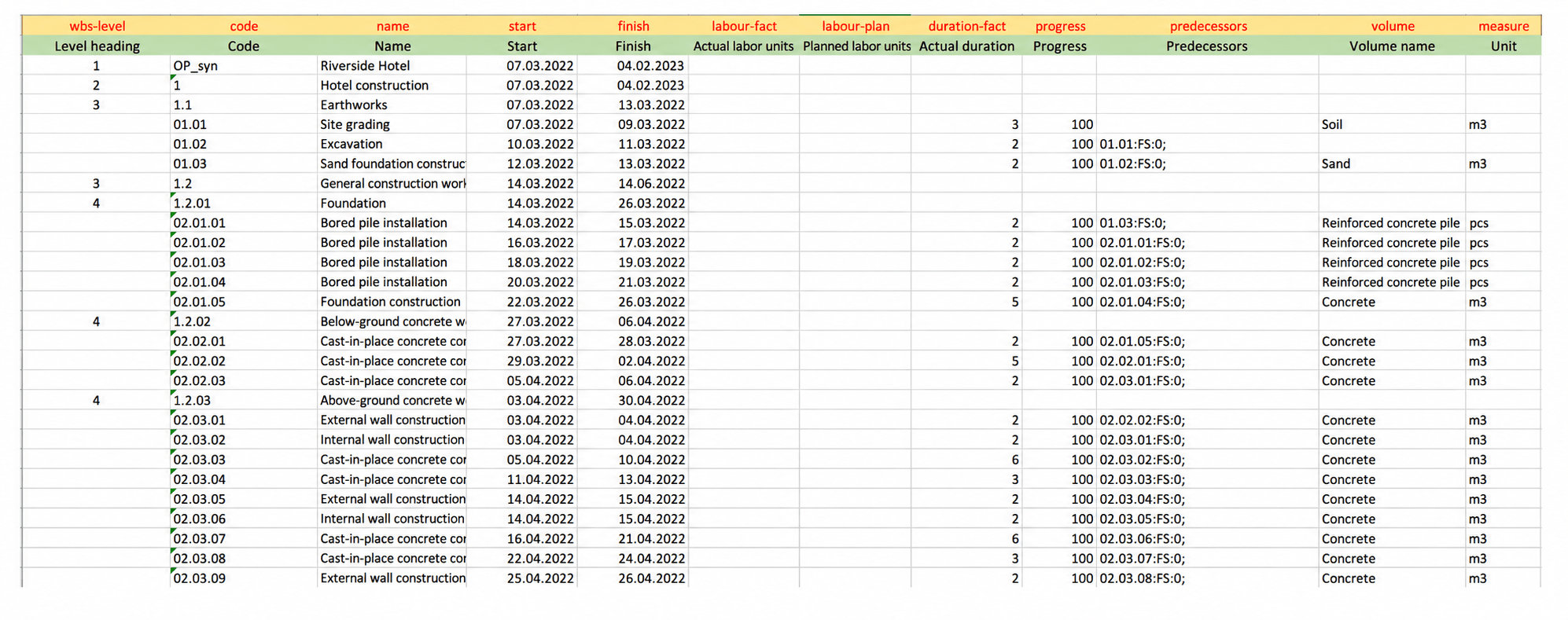 Example .xlsx File for Export to PLAN-R